












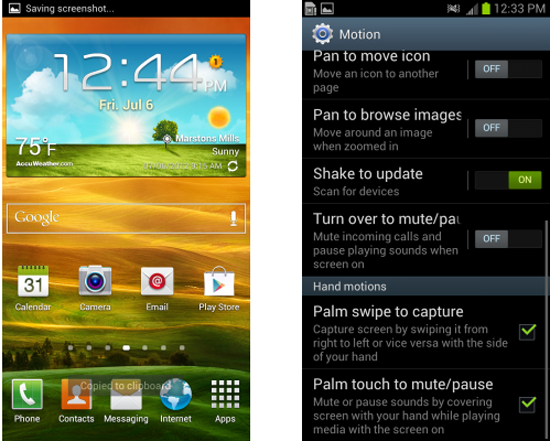
One of the most basic features that most Android users want is the ability to take screenshots although its slightly different on the Samsung Galaxy S III. There are currently two different ways that you can take a screenshot with your Galaxy S III with neither one of them being holding the power button and volume down button at the same time (which is the normal Android way to take a screenshot). Method one for taking a screenshot is close to other Android devices while method two uses Samsung’s features called “motions”.
How to take a screenshot on the Galaxy S III (Method 1):
- Go to the screen that you want to capture
- Press the power button and home button at the same time
- Screenshot will be saved to your Gallery
How to take a screenshot on the Galaxy S III (Method 2):
- Go to your Galaxy S III settings
- Open the Motion tab by tapping it
- Make sure the top Motion checkbox is checked
- Make sure “Palm swipe to capture” is checked
- Use the side of your palm and slide it on the screen
- Presto it takes a screenshot
Either way you choose is fine and both will save the screenshot to your Galaxy S III gallery. Its nice to see that you have two different options for taking screenshots. Anything you have to say or questions can be posted in the comments below.
How do you delete screenshots on the Galaxy III???
Somehow I have 41 and there is no delete options… help