












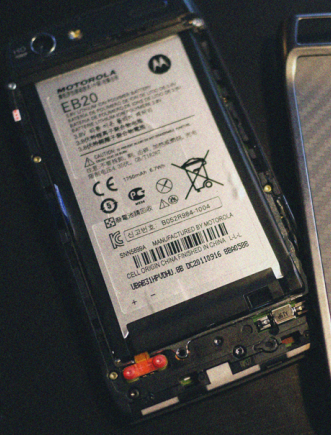
 The Motorola Droid RAZR and RAZR MAXX battery is removable although it takes a little effort the first time you need to remove it. Since Android tends to require a battery pull occasionally especially with the dev community and when modifying devices we have to wonder why Motorola made it so difficult.
I have verified that the battery is removable although will take a bit of tugging and freak out moments. This is such a tough process because Motorola has actually glued the back of the RAZR to the batter and battery to the device. If you do need to remove the battery start at the top and work your way around the back cover slowly breaking it away. This sill break the glue between the layers of the device until the back plate comes off.
Keep in mind that once the cover is off it is easy to snap back on and off. When you are taking the back off also note that the plate is very strong and can handle a good bit of bending while still keeping its shape. Thank you Kevlar. As much bending as we did we are almost satisfied that it can take a bullet.
According to Motorola removing the battery from the Droid RAZR and RAZR MAXX voids the warranty but you have to do what you have to do. If your device requires a battery pull because of an OS freeze we have to assume that Motorola will be lenient with the warranty issues.
that was scary, but worked..no longer frozen.